Guest Portal
Everything your guests need for their stay, in one login
Guests log in to see their reservation and unit details, pay their balance, review and accept their rental terms, and turn on autopay. Your team spends less time taking card numbers over the phone and following up on unsigned terms.
Guests handle the routine questions themselves
When is check-in? What do I still owe? Did I accept the terms? Guests can find the answers in the portal instead of calling your office.
Balances paid without a phone call
Guests see their balance and anything past due, and pay it themselves.
Rental terms accepted online
Guests open their rental terms, review them and accept them in the portal, with no paperwork to chase.
Autopay guests turn on themselves
Guests turn on autopay, so upcoming payments are collected on schedule. Autopay is only available with RNS Payments.
Schedule a demo
Join our community of hundreds of customers who trust RNS as their rental management platform.
What guests see when they log in
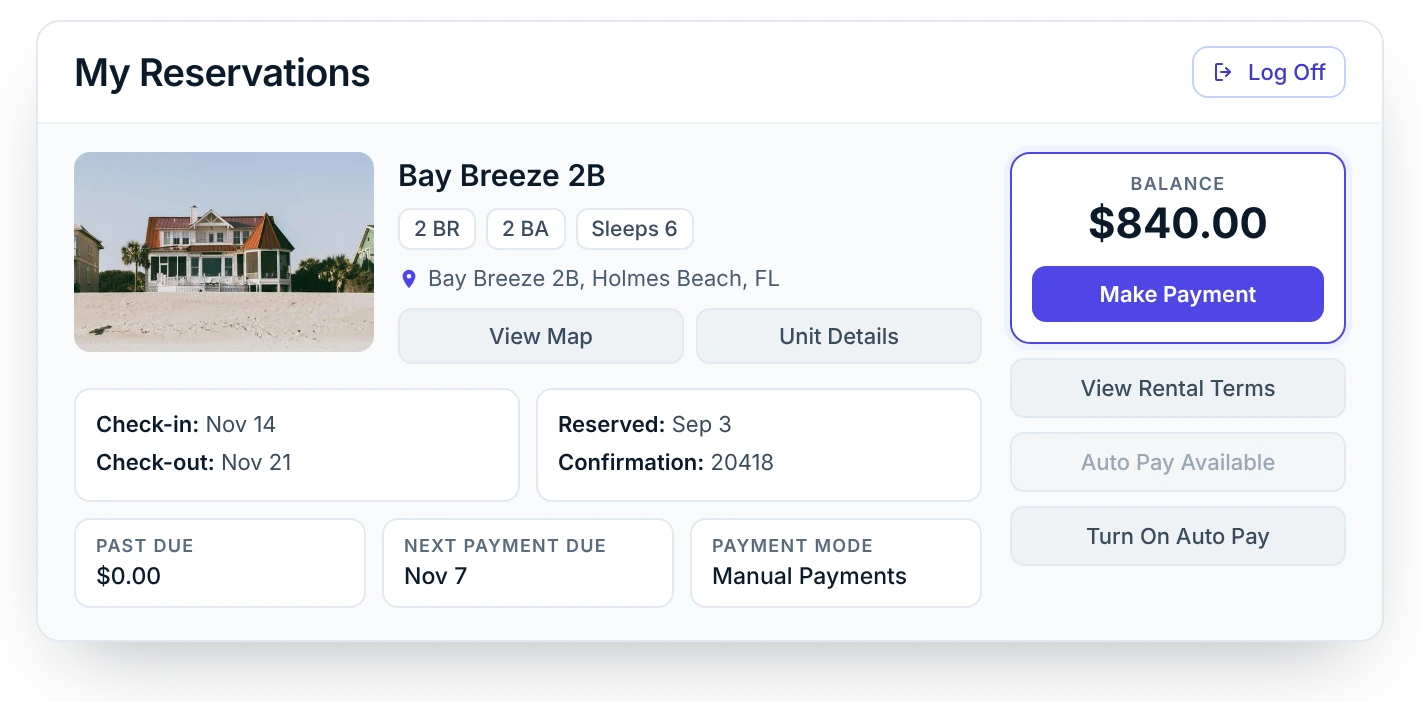
Everything on the My Reservations screen, for current and past stays.
Reservation details
Check-in and check-out dates, the date reserved and the confirmation number.
Unit details
A photo of the unit, bedrooms, bathrooms, how many it sleeps, the address, a map and full unit details.
Balance and payments
The balance, anything past due, the next payment due and the payment mode, with a Make Payment button.
Rental terms
Whether the rental terms are accepted, with a link to view and accept them.
Auto pay
Guests turn on autopay when it's available for their reservation (RNS Payments only).
Contact info and past stays
The name, address, email and phone on file, which guests can update, plus a list of past reservations.
What our clients have to say
Locally-rooted, independent, and unwaveringly customer-centric.

“Used RNS windows program pre 2017 and then move to another company using a different software and then it was time to change again and move back to RNS. They have been the best to train with, the system is easy and makes life run smoothly! Cannot say enough great things about RNS—10/10 will always recommend!“

“RNS, what a GREAT Company! I previously used Quick Books and another property management program for reservations, now it is all incorporated. I can do owner statements and pay bills in a fraction of the time. The support department is great.”

The RNS API along with our RNS program has enabled us to dramatically reduce labor costs—not to mention human error—as we strive to enhance our web marketing and presence.

When my business partner and I opened our own vacation rental company in December of 2013, we never considered going with anyone other than RNS! We’d used their product and services when we worked for other companies, so we knew that not only does RNS provide everything we need, but lots of options we haven’t even explored yet. Most importantly, we knew we’d get excellent customer service, and we were right!

We manage over 100 properties on and around Anna Maria Island. Without comprehensive software to help us manage these properties it would be impossible. The main functions that RNS provides our team for our Vacation Rentals and Annual Rentals are Accounting, Management, and Reservations.